Turn visual inspiration into words you can create with. Upload a picture and get an English prompt to adapt for your favorite AI image generator.
01 / YOUR PICTUREJPG, PNG, WebP · Up to 5 MB
We don’t store your pictures, questions, or results. Your input is sent to our AI providers only when you generate. How your data is processed →
Create an English visual prompt to adapt for your favorite image generator.
Loading bot protection…
Free to use. No sign-up required. Daily and rate limits apply.
02 / THE WORDS
Generated Prompt
✳
A picture is worth a few good words.
Upload an image, then click Generate Prompt. Your prompt will appear here.
AI-generated results may miss or misinterpret details. Review important information before using it.
Free to use ✳ No sign-up required ✳ Works online
Turn an Image Into a Detailed AI Prompt
Our image to prompt generator turns visible details into a clear, reusable creative reference. Start with the subject, then capture the composition, light, colors and visual style that make the image distinctive.
Instead of writing everything from scratch, copy the generated prompt and make it your own. It gives you a starting point for a new image, with room to change the setting, palette or mood.
If you want to put an existing image into words, you can also describe a picture with a short description, a detailed explanation or an alt text draft.
FROM REFERENCE TO WORDS
Image to Prompt Examples
AI-created reference images with prepared prompts, reviewed to match each picture. Try an example to load its image; a new prompt is generated only when you click Generate Prompt.
Photography / PREPARED EXAMPLE
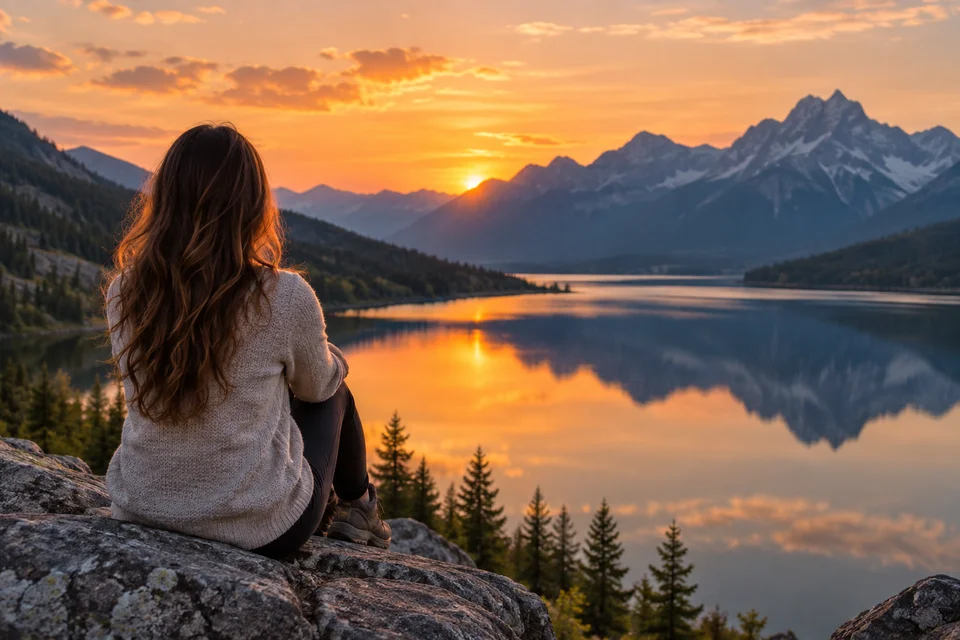
Mountain Lake at Sunset
A scenic photograph of a woman seen from behind, sitting on a rocky overlook above a calm mountain lake at sunset. Frame her in the left foreground in a light knitted sweater, facing distant blue mountains. Reflect the orange sky and mountain silhouettes in the water, with dark evergreen trees along the shore. Warm light outlines her hair against the cool landscape, creating a peaceful, contemplative atmosphere with natural fabric and stone textures.
Minimalist Product / PREPARED EXAMPLE
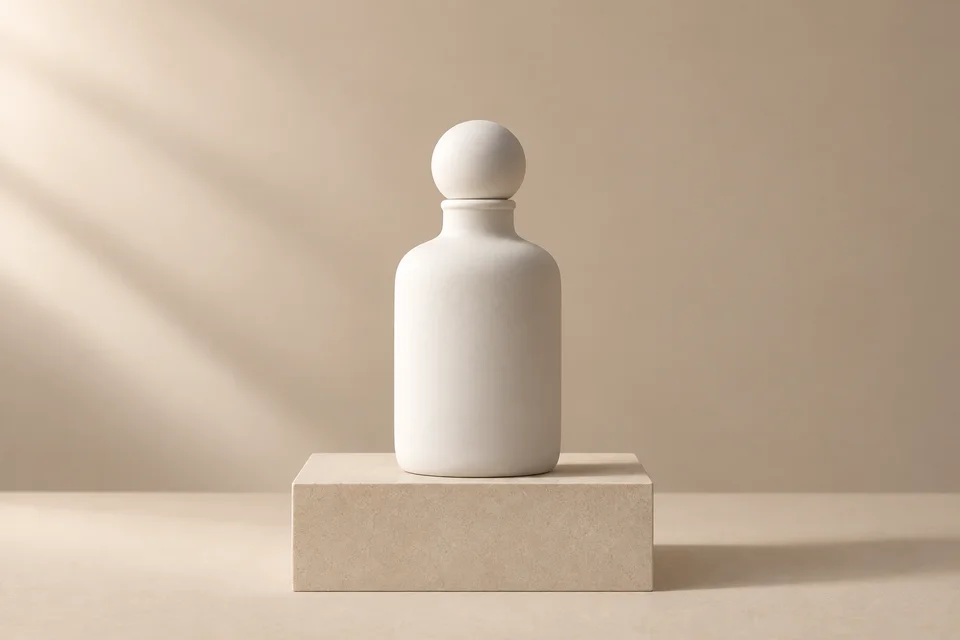
White Bottle, Soft Light
A minimalist studio product photograph of an unbranded matte white bottle with rounded shoulders and a spherical stopper. Center the bottle on a low rectangular beige pedestal against a warm neutral background. Use soft light from the upper left, delicate surface texture and a gentle shadow extending to the right. Keep the palette cream, white and sand, with ample empty space and a clean, calm editorial composition. No lettering or decorative props.
Anime Illustration / PREPARED EXAMPLE
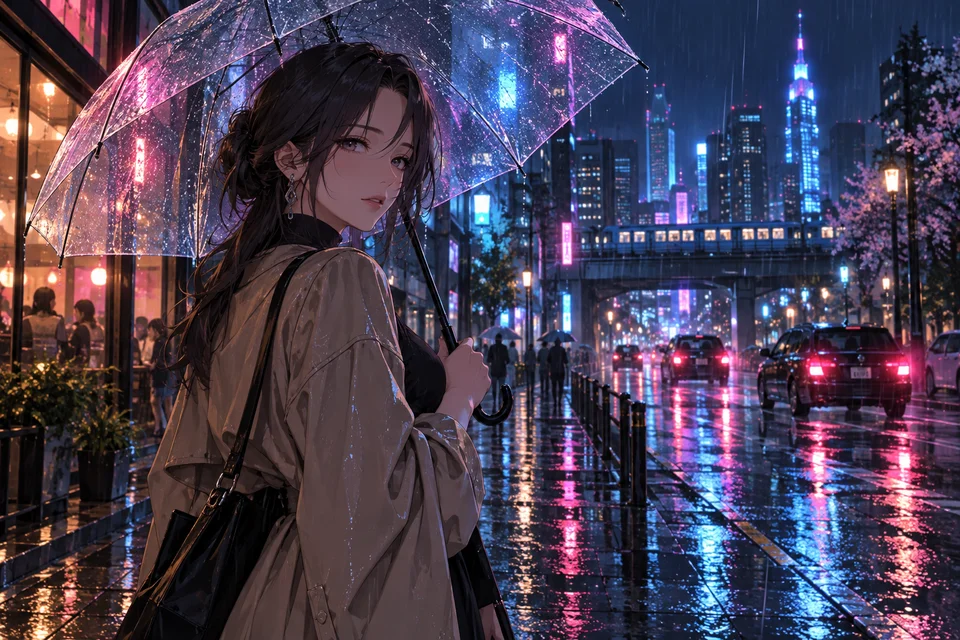
Neon Rain
An anime-style digital illustration of a dark-haired woman looking back beneath a transparent umbrella on a rainy city street at night. Place her in the left foreground, wearing a light coat and holding the umbrella handle. Fill the background with illuminated towers, an elevated train, cars and small figures beneath umbrellas. Blue and magenta lights reflect across wet pavement and raindrops on the canopy, balanced by warm shop windows. Use detailed urban scenery and a cinematic, atmospheric mood.
THREE SIMPLE STEPS
How to Use the Image to Prompt Generator
01
Upload Your Image
Choose, drag and drop, or paste one photo, illustration or other supported image. Check the preview before sending.
02
Generate an AI Prompt
Complete the verification and click Generate Prompt. The tool analyzes visible content, composition, lighting, color and style.
03
Copy and Use Your Prompt
Review the details, copy the prompt, and edit it for your chosen image generator and creative goal.
What Does the Image to Prompt Generator Analyze?
A useful prompt combines the main subject with the visual choices around it. Clear references help the AI recognize these details.
Subject
The main person, object, animal, product or landscape that gives your image its focal point.
Composition
Framing, placement, depth and how the visible elements relate to one another.
Lighting
Visible light and shadow, from soft daylight and warm sunsets to dramatic studio lighting.
Colors
The dominant palette, contrast, saturation and balance of warm and cool tones.
Art Style
Visual qualities such as photography, anime, watercolor, digital illustration or minimalism.
Camera and Perspective
Visible framing and viewpoint, such as a close-up, wide scene or overhead view, without guessing hidden camera settings.
Background and Environment
The setting, scenery, props and supporting details around the main subject.
Mood and Atmosphere
The visual impression of a scene: peaceful, dramatic, nostalgic, mysterious or playful.
Generate Prompts for Popular AI Image Tools
Copy a general English prompt and adapt it for the tool you use. This page does not connect to these tools or generate an image; each tool may interpret your words differently.
Image to Prompt for ChatGPT
Bring a written visual reference into your creative workflow and refine the subject, setting and style you want.
Image to Prompt for Midjourney
Start with composition, lighting and scene details, then add supported parameters in your chosen tool.
Image to Prompt for Stable Diffusion
Use a descriptive base prompt and tailor its wording to the model and workflow you have selected.
Image to Prompt for Flux
Adapt natural-language scene details and visual relationships to your next image-generation experiment.
Why Use Our Image to Prompt Generator?
Free to Use
Try turning a reference into a prompt for free.
No Sign-Up Required
Get started without creating an account.
Works Online
Upload and copy directly in your browser, with no software to install.
Less Manual Writing
Start from a visual analysis instead of a blank page.
Detailed Visual Prompts
Capture more than the subject, including light, composition, colors and atmosphere.
Easy to Edit and Reuse
Copy the result and adapt it to your preferred style, format and creative goal.
Image to Prompt Generator vs. Image Describer
Both analyze a picture. Choose the output that fits what you want to do next.
Purpose
Image to Prompt Generator
Image Describer
Main goal
Create an AI generation prompt
Explain what an image contains
Output
Prompt-style visual instructions
Natural-language description
Typical details
Style, light, composition and mood
Objects, people, actions and scene
Best for
Developing a new visual idea
Understanding and explaining content
To understand an image, ask a question or extract its text, try the AI Image Describer.
Who Is the Image to Prompt Generator For?
AI Artists
Study reference images and turn visual ideas into editable prompts.
Designers
Put compositions, palettes and styles into words for a creative brief.
Content Creators
Develop starting points for thumbnails, social graphics and illustrations.
Photographers
Explore language for lighting, framing, perspective and mood.
Prompt Creators
Use references to build a more precise visual vocabulary.
Tips for Getting Better Image Prompts
Use a Clear Reference
Choose an image with an easy-to-see subject and visual style. Crop away distractions when helpful.
Edit the Generated Prompt
Check it against the picture. Remove mistakes and keep only the details you want to use.
Specify Your Desired Style
Refine broad style words such as watercolor, anime, editorial photography or minimalism.
Add Format Details
Set orientation or aspect ratio in your chosen image tool when it supports them.
Adapt It to Your AI Tool
Different image generators interpret prompts differently. Adjust the wording based on the result you want.
GOOD QUESTIONS
Frequently Asked Questions
What is an image to prompt generator?
It analyzes an image’s visible characteristics and turns them into a text prompt, including subject, composition, lighting, colors, style and atmosphere.
Is this image to prompt generator free?
Yes. You can use the image to prompt generator for free, with no sign-up required.
Do I need to sign up?
No. Upload an image and generate a prompt without creating an account.
How do I convert an image to a prompt?
Upload your image, complete the verification and click Generate Prompt. Review the result, then copy and adapt it for your preferred image generator.
Can I use the generated prompt with ChatGPT?
Use the English prompt as a starting point, then refine the wording around the image you want to create. Results depend on the image tool you use.
Can I use it for Midjourney?
You can adapt the visual description for Midjourney. Add any supported parameters in that tool; this page produces a general prompt without platform-specific syntax.
Can I generate Stable Diffusion prompts from images?
This tool creates a descriptive base prompt you can customize for Stable Diffusion. It does not select a model or generate a separate negative prompt.
Does it recover the original prompt?
No. It creates a new interpretation of visible details, rather than recovering an original prompt or reading image metadata. It cannot guarantee an identical image.
What types of images can I use?
Use a photo, illustration, artwork, product image, landscape, portrait or screenshot you have permission to upload. Upload one JPG, PNG or WebP up to 5 MB, no more than 8,192 pixels on either side and 24 megapixels in total.
Is it the same as an image describer?
An image describer explains what appears in a picture. This tool organizes visual details into a prompt you can use as a starting point for image creation.
What happens to my image?
Your image is sent to our AI providers when you generate. Our application does not store your images or output text. Providers process your input under their own data policies. See our Privacy Policy for details.